Introduction
Welcome to our comprehensive guide on mastering the Amazon Tap! In this article, we will provide you with all the information you need to make the most out of this incredible device. Whether you’re a new user or someone looking to enhance your existing experience, we’ve got you covered. Let’s dive in!
What is the Amazon Tap?
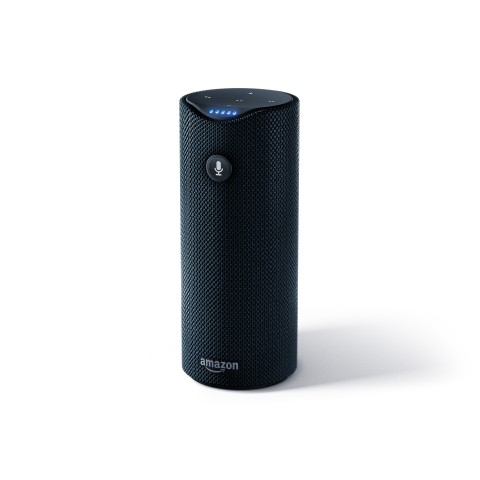
The Amazon Tap is a portable Bluetooth speaker that also functions as a virtual assistant, allowing you to access a wide range of features and services. With its compact design and built-in Alexa voice control, the Tap brings convenience and entertainment to your fingertips.
Setting Up Your Amazon Tap
To get started with your Amazon Tap, follow these simple steps:
- Unbox the device and ensure all the components are present.
- Plug in the power adapter and charge the Tap fully.
- Download and install the Amazon Alexa app on your smartphone or tablet.
- Open the app and follow the on-screen instructions to connect your Tap to a Wi-Fi network.
- Once connected, you can personalize your Tap’s settings and preferences through the app.
Exploring Amazon Tap Features
1. Music Playback
The Amazon Tap offers a seamless music playback experience. Here’s how you can make the most of it:
- Connect your Tap to popular music streaming services like Amazon Music, Spotify, or Pandora.
- Use voice commands to play specific songs, artists, genres, or playlists.
- Enjoy immersive audio quality with the Tap’s powerful speakers.
2. Smart Home Control
With its integration of Alexa, the Amazon Tap can serve as a hub for controlling your smart home devices. Here are some ways to maximize this feature:
- Connect your compatible smart devices, such as lights, thermostats, or security systems, to your Tap.
- Use voice commands to control your smart home devices without lifting a finger.
- Create routines and schedules to automate various actions throughout your day.
3. Information and News
The Amazon Tap is your gateway to instant information and news updates. Here’s how you can stay informed:
- Ask Alexa for weather forecasts, sports scores, stock prices, and more.
- Get the latest news updates from your preferred news sources.
- Set reminders, timers, and alarms to keep your schedule on track.
4. Skills and Customization
Take advantage of Alexa’s skills to personalize your Amazon Tap:
- Browse the extensive collection of skills available in the Alexa app.
- Enable skills that align with your interests and hobbies, such as cooking, fitness, or language learning.
- Customize your Tap’s wake word to enhance the voice interaction experience.
Troubleshooting and Tips
In case you encounter any issues with your Amazon Tap, try these troubleshooting tips:
- Make sure your Tap is connected to a stable Wi-Fi network.
- Verify that the Alexa app is up to date on your smartphone or tablet.
- Restart your Tap by holding down the power button for 20 seconds.
- Contact Amazon’s customer support for further assistance if needed.
Conclusion
Congratulations on completing our ultimate guide to mastering the Amazon Tap! By now, you should have a thorough understanding of its features and how to optimize your experience. Whether you’re using it for music, smart home control, or accessing information, the Amazon Tap is a versatile companion that can simplify your life. Enjoy your journey with this incredible device!